FLEXBOX — PRECISE NOTES
🔹 1. Basic structure
Flex container → parent element
Flex items → direct children
.container {
  display: flex;
}
🔹 2. flex-direction
Defines the direction of the main axis.
flex-direction: row | row-reverse | column | column-reverse;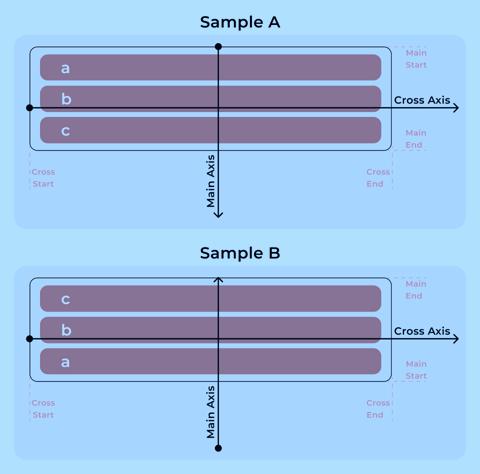
Values
➤ row (default)
- main axis → horizontal (left → right)
- cross axis → vertical
➤ row-reverse
- main axis → horizontal (right → left)
➤ column
- main axis → vertical (top → bottom)
- cross axis → horizontal
➤ column-reverse
- main axis → vertical (bottom → top)
🔹 3. Axes
🧭 Main axis
- direction defined by
flex-direction - elements are placed along this axis
🧭 Cross axis
- perpendicular to main axis
- direction depends on main axis
🔹 4. Start / End points
These define where elements begin and end.
🔸 Main axis points
- main-start — starting point of main axis, first element appears here
- main-end — ending point of main axis, last element appears here
🔸 Cross axis points
- cross-start — start of cross axis, used for alignment across axis
- cross-end — end of cross axis
🔹 5. Direction examples
Example 1
flex-direction: row;
- main axis: left → right
- main-start: left
- main-end: right
- cross-start: top
- cross-end: bottom
Example 2
flex-direction: row-reverse;
- main axis: right → left
- main-start: right
- main-end: left
Example 3
flex-direction: column;
- main axis: top → bottom
- main-start: top
- main-end: bottom
- cross-start: left
- cross-end: right
Example 4
flex-direction: column-reverse;
- main axis: bottom → top
- main-start: bottom
- main-end: top
🔹 6. Key rules
- ✔ Elements are placed from main-start → main-end
- ✔ Cross axis is always perpendicular
- ✔ Start/end depend on direction (not fixed positions)
🔥 SHORT MEMORY VERSION
- flex-direction → sets main axis
- row → horizontal
- column → vertical
- main axis → controls layout direction
- cross axis → perpendicular axis
- points → main-start = begin, main-end = finish
- cross-start → alignment start
- cross-end → alignment end